
Mastering Depth of Field and Exposure in Watch Photography
Understanding Depth of Field in Watch Photography
Depth of field (DoF) is the zone of sharpness within your photograph. In watch photography, controlling this element separates amateur snapshots from professional-looking images. When done correctly, your watch becomes the clear focal point while the background fades into an aesthetically pleasing blur.
How Aperture Controls Depth of Field
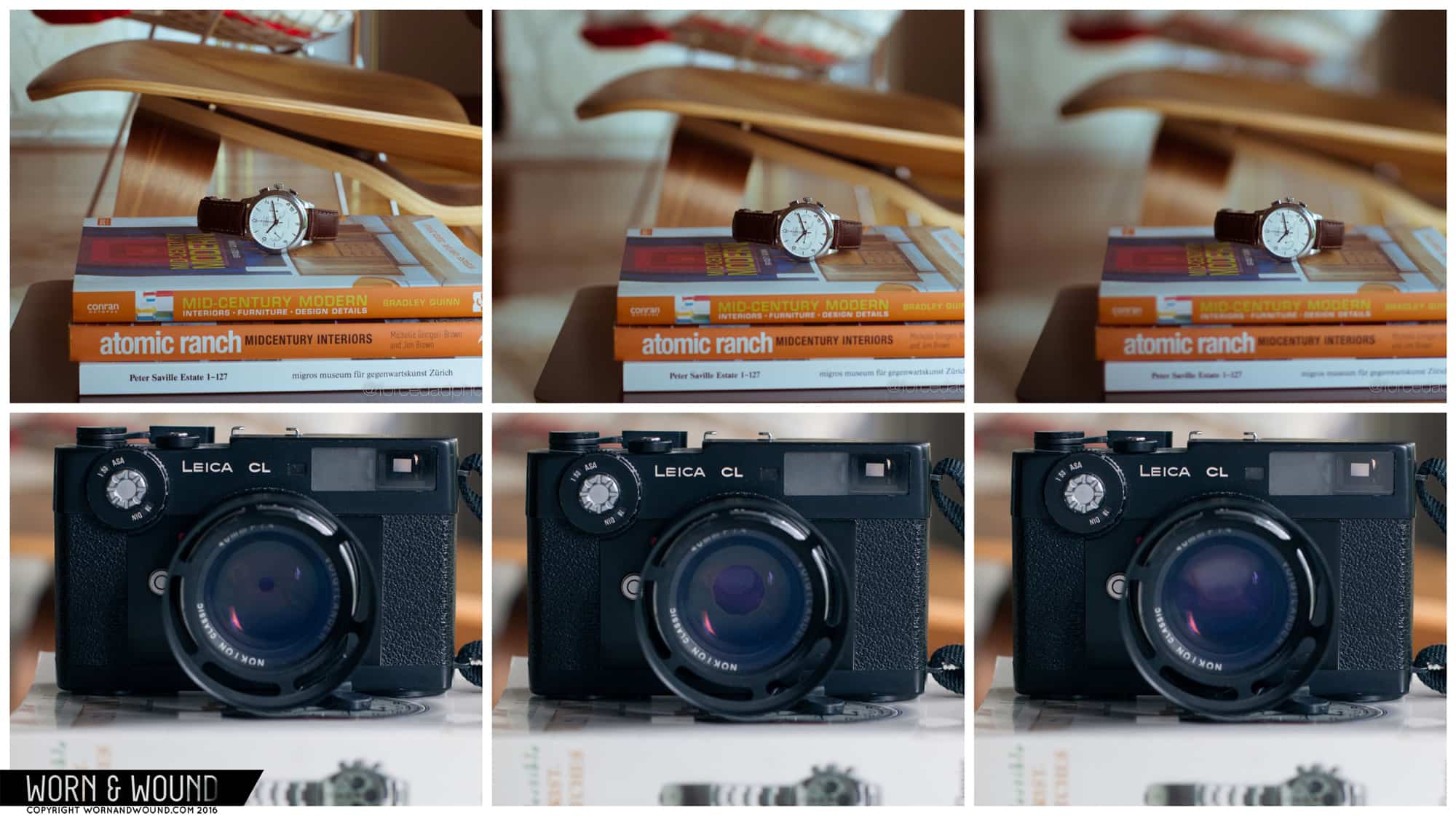
The lens aperture, measured in f-stops, is your primary tool for controlling depth of field. The relationship is counterintuitive: smaller f-stop numbers create wider apertures and shallower depth of field.
| F-Stop | Aperture Opening | Depth of Field | Best For |
|---|---|---|---|
| f/1.4 - f/2.8 | Wide | Shallow | Artistic portraits, bokeh effects |
| f/4 - f/5.6 | Medium | Moderate | General watch photography |
| f/8 - f/11 | Narrow | Deep | Full watch detail, product shots |
| f/16 - f/22 | Very Narrow | Very Deep | Environments, multiple watches |
For most watch photography, f/5.6 to f/8 provides an ideal balance between subject sharpness and background separation. Shooting at f/1.4 or f/2 can create beautiful bokeh but risks missing critical details on the dial.
Additional Factors Affecting Depth of Field
Three other elements influence DoF beyond aperture:
- Subject-to-camera distance: Closer subjects produce shallower depth of field
- Focal length: Longer lenses (200mm) create shallower DoF than shorter ones (50mm)
- Sensor size: Larger sensors achieve more background blur at equivalent settings
Modern smartphones simulate shallow depth of field using software, though results vary significantly from optical blur produced by dedicated cameras.
Mastering Exposure: ISO and Shutter Speed
Exposure determines the brightness of your image. Most photographers shoot in aperture priority mode, setting the f-stop while the camera calculates optimal shutter speed. For greater control, manual mode offers precision but requires practice.
ISO represents your camera's sensitivity to light. Lower ISO values (100-400) produce cleaner images with minimal noise. Higher ISO settings (800+) introduce visible grain, useful only when additional light is unavailable.
Shutter Speed Considerations
When shooting at narrower apertures (higher f-stops), you'll need slower shutter speeds to compensate for reduced light. A tripod becomes essential for exposures longer than 1/20th of a second to prevent camera shake. Additionally, slower shutter speeds risk capturing motion blur from sweeping second hands.
| Scenario | Recommended Settings | Notes |
|---|---|---|
| Bright daylight | f/8, ISO 100, 1/500s | Clean, sharp results |
| Window light | f/5.6, ISO 200, 1/60s | May need tripod |
| Light box | f/8, ISO 100, 1/30s | Tripod required |
| Low light | f/4, ISO 400, 1/20s | Consider faster lens |
RAW vs JPEG: File Format Considerations
If your camera supports it, shooting in RAW format preserves maximum data for post-production editing. RAW files are significantly larger than JPEGs but offer greater flexibility for adjusting exposure, white balance, and color. For casual social media sharing, JPEG provides adequate quality with smaller file sizes.
Bokeh: The Art of Beautiful Blur
Bokeh refers to the aesthetic quality of out-of-focus areas. When shooting with wide apertures, light reflections in the background create pleasing circular highlights. This effect adds artistic flair to watch photography, particularly for wrist shots where environmental elements create visual interest behind the subject.
Source: Worn & Wound - Watch Photography 101: Part 2 - Depth of Field, Exposure, and Staging
Frequently Asked Questions
What aperture should I use for watch photography?
For most watch photography, f/5.6 to f/8 provides ideal results. This range maintains sharp focus across the entire watch while creating subtle background separation. For artistic shots emphasizing specific details, wider apertures (f/2.8 or lower) can create dramatic bokeh effects.
Why are my watch photos blurry?
Blurriness typically results from camera shake during slow shutter speeds or incorrect focus. Use a tripod for exposures slower than 1/60th of a second and ensure your focus point targets the watch dial, not the background or crystal reflections.
Should I shoot in RAW or JPEG?
Shoot RAW if you plan to edit photos extensively, as it preserves maximum data for adjustments. For quick social media sharing without post-processing, JPEG provides adequate quality with significantly smaller file sizes.
Related: Basic Lighting Principles for Watch Photography, Essential Watch Photography Equipment